¶ M-Design Hub v2.1.1 Release Notes
Version: v2.1.1
Date:29/9/2026
Download: https://github.com/Monport-Laser-Office/Monport-Design-Hub/releases
This update delivers 9 improvements across five areas: connection stability, conveyor setup and debugging, AutoForge capabilities, UI interaction, and preview performance.
¶ 1. Connection & Device Recognition
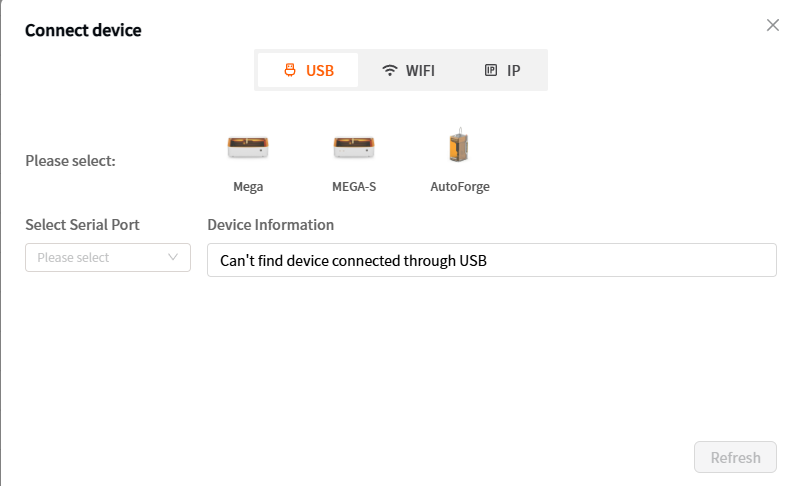
1. Manual machine model selection for USB connection
When connecting over USB, you can now select your machine model manually. The software then connects using that model's serial parameters, which significantly improves serial port detection speed and connection success rate — no more relying on automatic scanning.
¶ 2. Conveyor Mode
2. Conveyor movement control and focus test
Conveyor mode now includes movement control with a distance setting, so you can precisely control how far the conveyor moves forward or backward. A focus test has also been added in this mode to verify that conveyor movement and distance settings are working correctly.
¶ 3. AutoForge
3. Customizable AutoForge framing time
A new AutoForge framing time setting lets you adjust the framing duration to suit your material and workflow, balancing positioning accuracy against time.
4. New AutoForge relief mode
You can now select AutoForge relief mode for relief engraving and produce proper relief effects in your work.
5. Improved AutoForge firmware update flow
Click “More” to check whether your AutoForge firmware is up to date. If a newer version is available, you can update to the latest firmware in one click.
6.Fixed an issue where the program would freeze when too many engraving passes were used.
¶ 4. UI & Interaction
7. Relocated software settings entry
The settings entry has moved to the top-right corner and now opens as a pop-up dialog, so adjusting settings no longer affects the canvas and requires no page switching.
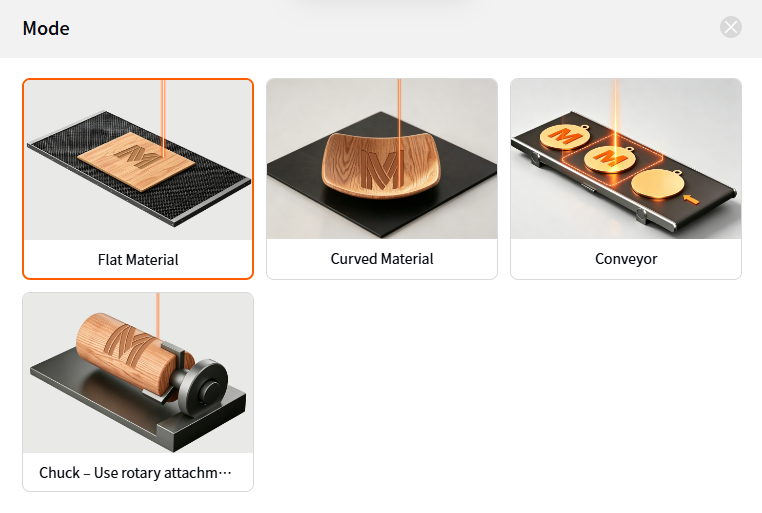
8. Upgraded engraving mode selector
The engraving mode selector has changed from a dropdown to a pop-up selector, making all available modes visible at a glance.
¶ 5. Performance & Stability
9. Major preview page performance improvements
The preview page now shows canvas elements by default, with an option to switch to path preview. Jumping to the preview page is now noticeably faster in both loading and responsiveness.
10. New feedback ticket entry
Users can now submit feedback or file a support ticket directly in the software, with no need to go through other channels.
¶ Get Help
- Please contact support@monportlaser.com for assistance.